Free · for posts, stories and reels
How to Remove AI Info from an Instagram Post
Remove AI info from an Instagram post before you share it. Drop in the photo or video, see the app that wrote the AI data and download a clean copy for your post, story or reel.
- Files never leave your device
- Posts, stories and reels
- Save to Photos on iPhone
- Free, no sign-up
your.account
AI info

your.account Matcha with a view
matcha-post.png
FIND THE CAUSE
Why your Instagram post shows AI info
To remove AI info from an Instagram post, first find out where it comes from. Instagram adds it for one of a few reasons, and each has its own fix. Answer up to three questions.
Question 1
Did you turn on Add AI label (Label AI in a story) when you shared it?
Every answer at a glance
The AI data in your file adds the label
The app wrote C2PA or IPTC AI data into the file, and Instagram reads it on upload. Drop the file into the tool above: the AI info comes off and the copy is checked again, 0 AI labels left. Post that copy and the file gives Instagram nothing to label.
Check the file first
Some apps write AI data without telling you. If the tool above finds any, remove it and post the clean copy. If it finds none, Meta’s systems detected the picture itself.
You added the label yourself
Share it again with the switch off. Check the file too: if an app also wrote AI data into it, Instagram adds the label anyway.
Meta labels what Meta AI makes
Content made with Meta AI gets the label, also when you download it and post it again. That label does not live in the file, so no file tool removes it.
WHAT INSTAGRAM READS
How Instagram decides to show AI info
Two kinds of data in the file, read when you upload
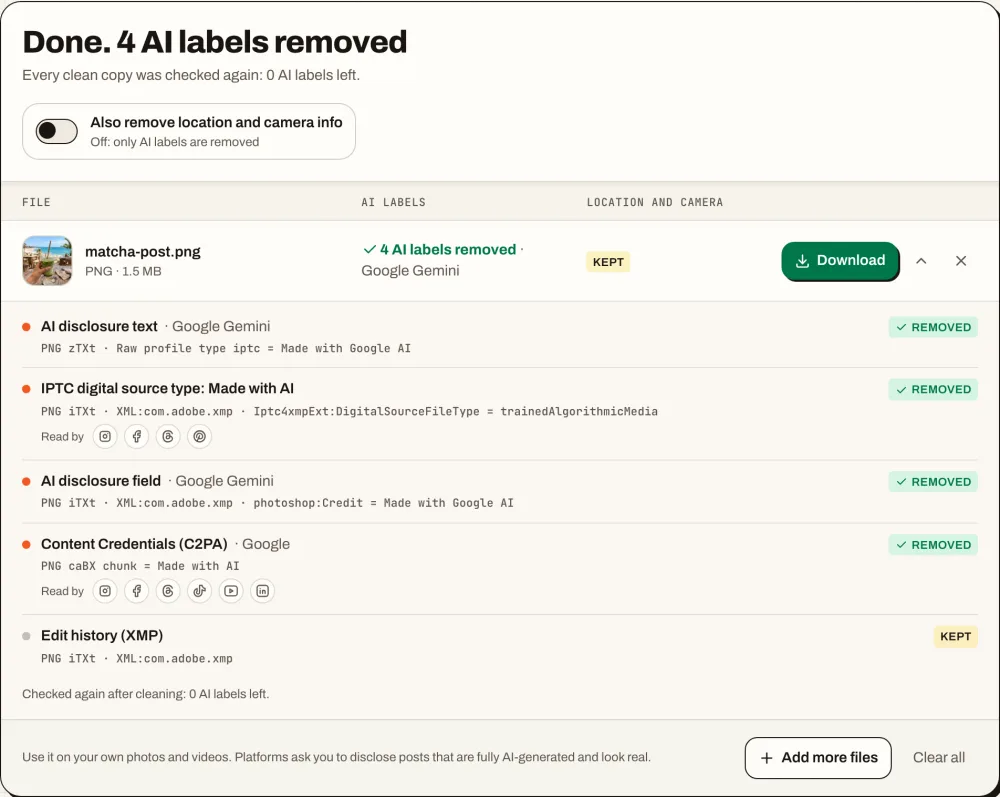
Meta reads the C2PA and IPTC data that AI apps write into files, and says this lets it label images from Google, OpenAI, Microsoft, Adobe, Midjourney and Shutterstock. The matcha image above, made with Nano Banana, carries four such fields. To remove AI info from an Instagram post made with it, all four have to go, and the report checks that they did.
- C2PA Content Credentials, read by Instagram, Facebook and Threads
- The IPTC digital source type and AI credit lines
- Labels from Meta’s own systems, which are not in the file
POST, STORY, REEL
Remove AI info from an Instagram story, reel or post
To remove AI info from an Instagram post, story or reel, clean the file before you share it: Meta’s labels cover all three and read the same data in the file. Pick the one you are about to share.
your.account
AI info
your.account Matcha with a view
Where the label shows: under your account name, above the photo. For a photo only edited with AI, Instagram puts it in the post menu instead.
- 1Clean every photo of the post above and tap Save to Photos.
- 2Create the post from the clean copies; for a carousel, pick all of them.
- 3Leave Add AI label off on the last screen, then share.
Edits made with Meta AI inside Instagram get Meta’s own label. The AI data Instagram reads from a file comes with the file you pick from your camera roll, so that file is the one to clean.
Where the label shows: under your account name at the top of the story.
- 1Clean the photo or video above and save it.
- 2Open the story camera and pick the clean copy from your camera roll.
- 3Leave Label AI off in the story options, then share.
A story stays up for 24 hours with its label, and its photo or video cannot be swapped after you share it. Clean the file first.
Where the label shows: with your account name over the reel.
- 1Clean the MP4 or MOV above; it is not re-encoded.
- 2Save it and add it to the reel editor from your camera roll.
- 3Leave Add AI label off on the share screen. Effects made with Meta AI inside Instagram get their own label.
Videos with Content Credentials, such as those from Adobe Firefly, carry C2PA that Instagram reads. The tool removes it from MP4 and MOV files without re-encoding, so the reel keeps its full quality.
AI INFO ON INSTAGRAM
How the AI info label on Instagram changed
The label changed name and place four times in 2024, which is why older posts about it disagree.
Feb 2024
Meta starts reading AI data in files
Meta announces labels for AI images on Facebook, Instagram and Threads, based on the C2PA and IPTC data that AI apps write into files.
May 2024
Made with AI
Meta starts adding Made with AI to content flagged by C2PA, IPTC or the poster’s own disclosure. Photos with small AI edits get it too, and photographers push back.
Jul 2024
Renamed AI info
The label becomes AI info, with a menu that explains why it is there.
Sep 2024
Edits move into the menu
For content only edited with AI, the label moves into the post menu. Content made with AI keeps it on the post.
Now
AI content label, and Captured with a camera
Instagram’s Help Center calls it the AI content label. A separate Captured with a camera label marks photos that carry a camera’s own credentials.
Sources: Meta newsroom (February and April 2024, updated July and September 2024) and the Instagram Help Center.
ALREADY POSTED
How to remove AI info from an Instagram post after posting
The label stays on a published post, because Instagram read the file when you uploaded it. Post the clean copy instead.
- 01
Keep the original file
Use the file from your camera roll or the app you made it in, not a download of the post.
- 02
Clean it here
Remove the AI info and check the report: 0 AI labels left.
- 03
Share it again
Delete or archive the labeled post and share the clean copy as a new post or story.
Remove AI info from an Instagram post: FAQ
Not from the published post. Delete or archive it, remove the AI info from your original file here and share the clean copy as a new post.
Open this page in Safari, tap Choose photos or videos and pick the photo. When the report shows 0 AI labels left, tap Save to Photos, then post the clean copy from your camera roll with Add AI label off.
Magic Eraser, Generative Fill and Galaxy AI mark the whole file as edited with AI, even for one small fix. Since September 2024 Instagram shows that label in the post menu instead of on the post. Remove the AI info from the file before you post and there is nothing to show. See which apps write AI labels.
Open this page in Chrome, tap Choose photos or videos and pick the file. When the report shows 0 AI labels left, save the clean copy to your gallery and post it with Add AI label off.
No. The label comes from the photo or video file, not the caption. To remove AI info from an Instagram post, share a clean copy of the file as a new post.
No. JPG, PNG and WebP files keep their image data byte for byte, and videos are not re-encoded. iPhone HEIC photos come back as JPG at 95% quality, the format Instagram turns them into anyway; very large ones are scaled to fit the browser’s limit on iPhone.
Not from a story you already shared. Delete it, remove the AI info from the original file here and share the clean copy as a new story.
It is a separate label for photos that carry a camera’s own Content Credentials, shown while those credentials are intact. AI Label Remover keeps them unless you turn on Also remove location and camera info.
A screenshot is a new file without the AI data, but it is smaller and softer than your photo. Removing the AI info keeps the original quality.
Yes. Facebook, Instagram and Threads use the same Meta labels and read the same C2PA and IPTC data, so one clean copy works on all three.
Instagram requires the label on realistic video and audio made with AI; for photos it is your call. Label fully AI-made photos that look real. The AI metadata remover shows every field it takes out.
Remove AI info from an Instagram post in seconds
Clean the photo or video for your next Instagram post, story or reel, then share the clean copy.