Free · runs in your browser
Metadata Remover
Remove metadata from photos and videos before you share them: GPS location, camera model, date taken, captions, edit history and AI tags. Everything runs in your browser and the picture stays the same.
- Files never leave your device
- GPS, camera and date removed
- Batch and ZIP download
- Photos and videos

lisbon-street.jpg
- Location
- 38.7115° N, 9.1465° W
- Camera
- Sample Camera · Demo
- Taken
- 14 Jun 2026, 16:42
WHAT A PHOTO GIVES AWAY
What the metadata in one photo reveals
The metadata remover read this from the sample photo above. Each line is something anyone who gets the file can see.
lisbon-street.jpg
Location pinned to the file
Read from lisbon-street.jpg
Location
Kept38°42′41″ N, 9°08′48″ W
The street the photo was taken on, in Lisbon
Camera
KeptSample Camera · Demo
The device you own
Taken
Kept14 Jun 2026, 16:42:10
When you were there, to the second
Credit
KeptMade with Google AI
How the picture was made (XMP and IPTC)
Source type
KepttrainedAlgorithmicMedia
An AI label platforms read
Orientation
KeptUpright
Which way is up
WHAT IS PHOTO METADATA
The four kinds of metadata a metadata remover takes out
Photo metadata is text stored next to the picture inside the file. It comes in four standards, most photos carry more than one, and the metadata remover reads and removes all four.
EXIF
Written by the camera or phone: make and model, lens, exposure, the date and time to the second, and GPS coordinates. The sample above reads Sample Camera · Demo, 14 Jun 2026 16:42:10, 38.7115° N.
XMP
Written by editing apps: the app used, edit history, ratings and AI fields such as DigitalSourceType, which the sample carries as trainedAlgorithmicMedia.
IPTC
Written for publishing: caption, keywords, author, copyright and credit lines. The sample’s credit line reads Made with Google AI.
C2PA
A signed record of where the file came from and how it was edited, written by AI apps and some cameras.
WHEN IT MATTERS
When to remove metadata from a photo
The metadata travels wherever the original file goes. These are the ways it goes out with you, and the moments to run the metadata remover first.
These pass the original file on
Metadata includedEmail attachments
The file goes out as it is, GPS included, and the person who receives it can read it in any photo viewer.
AirDrop
Shares the photo with its location unless you turn Location off under Options.
Cloud links
Google Drive, Dropbox and iCloud links hand over the original file to anyone who has the link.
Send as file in chats
WhatsApp documents and Telegram files keep everything; ordinary photo messages are re-saved.
Where the app decides
VariesSocial posts
Social apps re-save photos on upload and decide on their own what to keep.
Marketplace listings
Each marketplace handles uploads its own way. Cleaning first means you decide, not the site.
IN BULK
Remove metadata from photos in bulk
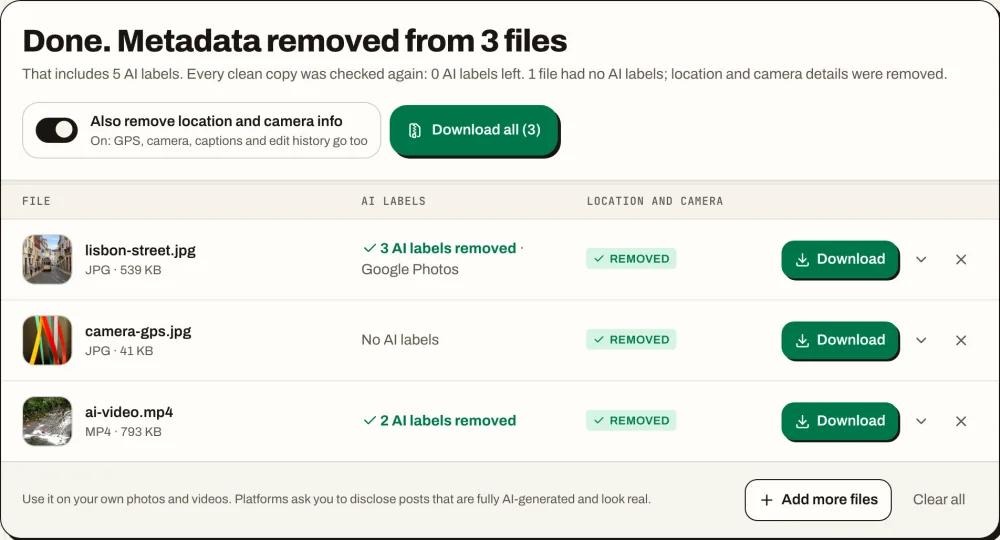
A whole batch, one ZIP
Drop in a folder’s worth of photos and videos. The metadata remover cleans each file in turn, gives it its own row with location, camera and AI data marked Removed, and checks it again. Download one file or all of them as a ZIP; the clean copies are named like holiday-clean.jpg and your originals stay as they were.
- Location, camera and AI data per file
- Every field listed with where it was stored
- Each clean copy scanned again
WITHOUT A TOOL
Remove metadata from a photo without an app, and what each way misses
Phones and computers have their own switches. They are worth knowing, and each one leaves something behind. The metadata remover takes out location, camera, date, captions, edit history and AI data in one pass, for a whole batch.
iPhone: share without location
In Photos, tap Share, then Options, and turn off Location. It applies to that one share only.
Removes location · leaves camera, date and AI dataiPhone: No Location
Open the photo, tap Adjust Location, then No Location. To stop it at the source, set Settings > Privacy & Security > Location Services > Camera to Never.
Removes location · leaves camera, date and AI dataMac: Preview
Open the photo in Preview, press Command-I, open the GPS tab, click Remove Location Info and save.
Removes location · leaves everything elseWindows: Remove Properties
Right-click the photo, choose Properties, then Details, then Remove Properties and Personal Information.
A security researcher found camera names still in the file afterwards
ANY DEVICE
Use the metadata remover on iPhone, Android, Mac and Windows
The metadata remover runs in your browser, so there is nothing to install.
- 01
iPhone and iPad
Open the page in Safari, pick photos from your library and tap Save to Photos. HEIC photos come back as JPG.
- 02
Android
Open it in Chrome, pick photos or videos and save the clean copies to your gallery.
- 03
Mac and Windows
Drop a whole batch in and download everything as one ZIP.
- 04
Nothing uploaded
Your files are read and cleaned on your own device and never sent to a server.
Metadata remover FAQ
No. JPG, PNG and WebP photos and MP4 and MOV videos keep their image data byte for byte. HEIC and AVIF photos are saved as JPG at 95% quality.
Photos in JPG, PNG, WebP, HEIC and AVIF and videos in MP4 and MOV. PDF, Word and audio files are not supported.
Many online metadata removers upload your photo to their server. This metadata remover runs in your browser instead: once the page has loaded you can turn off Wi-Fi and it still cleans JPG, PNG, WebP and video files. HEIC photos need one extra download the first time.
No. It makes a clean copy, saved as name-clean.jpg (or .png, .mp4 and so on). The original on your device stays exactly as it was.
Yes for photos: the EXIF date and time go with the rest. The file date your computer shows comes from the download and is not part of the photo.
There is no set limit. The metadata remover cleans the files one after another on your own device, and videos are read in parts, so long recordings work too.
Less than a camera photo, and no GPS. Whatever the phone wrote into the file, the metadata remover clears.
Drop the JPG into the metadata remover above. EXIF, GPS, XMP, IPTC, C2PA and comments come out; the color profile and orientation stay, and the image data is copied byte for byte.
The same way. The metadata remover drops the eXIf, text, XMP and C2PA chunks, AI prompts from Stable Diffusion included, and keeps the color chunks so the PNG looks the same.
Yes: Settings > Privacy & Security > Location Services > Camera > Never. Photos you already took keep their location until you remove it.
Yes. MP4 and MOV videos lose GPS, device model, XMP and C2PA without re-encoding. The recording time in the video’s own header stays.
Yes. GPS coordinates in EXIF and XMP, and the location in phone videos, are removed. The report marks location as Removed for each file.
Yes, with everything else. To remove only the AI labels and keep your camera details, use the AI metadata remover.
No. The metadata remover runs in your browser. Your files are read and cleaned on your device and never sent to a server.
Yes, with no sign-up and no daily limit. For AI labels on social posts, see how to remove AI info from an Instagram post.
Remove metadata before you share
Drop in your photos or videos and download clean copies in seconds.